

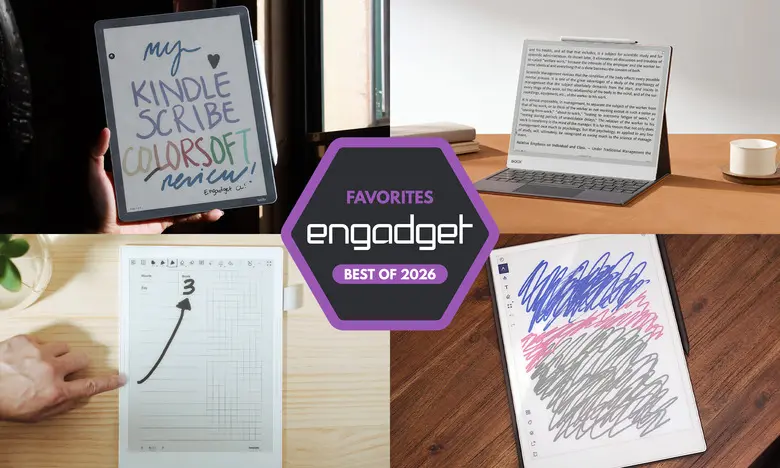
E Ink tablets have become a compelling middle ground between traditional paper notebooks and full-fledged digital tablets. These devices use electronic paper displays that mimic the look of ink on paper, offering a comfortable reading and writing experience that is easier on the eyes than standard LCD screens. Over the past few years, the category has expanded dramatically, with models ranging from small dedicated readers to large color displays that can handle apps and documents. The best E Ink tablets now offer low-latency handwriting, long battery life, and software features that make organizing notes and documents effortless.
For people who love the feel of pen and paper but want the convenience of digital storage, an E Ink tablet can be a worthwhile investment. They are particularly appealing to students, academics, and professionals who spend a lot of time reading long-form content or taking handwritten notes. Unlike traditional tablets, E Ink devices are designed to minimize distractions, so users can focus on writing and reading without constant notifications or social media temptations. The market has evolved to include color displays, cloud sync, and even app support, making these devices far more versatile than the early models.
Best E Ink tablets for 2026
Best E Ink tablet for most people: reMarkable 2
The reMarkable 2 remains the best choice for most people thanks to its well-rounded feature set and approachable interface. It has a 10.3-inch monochrome display with a slim, lightweight design that weighs less than a pound. The tablet feels premium in the hand, with a sleek aluminum body and a subtle bevel on the side that accommodates accessories like a folio case or optional keyboard. Its 8GB of storage is enough for thousands of documents, and the two-week battery life ensures users won't be reaching for a charger constantly.
The writing experience is outstanding. The optional Marker Plus includes a built-in eraser, but both the standard Marker and Marker Plus are tilt- and pressure-sensitive, requiring no batteries. Latency is nearly imperceptible, giving the device a paper-like feel. Reading on the reMarkable 2 is also pleasant, with support for PDFs and EPUB files. Users can sideload documents via the companion desktop or mobile apps, or connect cloud services like Google Drive, Microsoft OneDrive, and Dropbox. A Google Chrome extension lets users send web articles directly to the device, and files can be customized for text-only or PDF formats.
Software remains straightforward, with notebook creation, folder organization, and eight brush types. Handwriting recognition is surprisingly accurate, allowing users to convert scribbles into machine-readable text. A subscription called Connect costs $3 per month or $30 per year and adds unlimited cloud storage, syncing, and the ability to edit notes on other devices. A one-year membership is included with purchase. At $399 with the standard Marker, the reMarkable 2 is not cheap, but it offers a coherent, distraction-free experience that many users will find worth the price.
Best premium E Ink tablet: reMarkable Paper Pro
The reMarkable Paper Pro takes everything that made the reMarkable 2 successful and upgrades it with a larger 11.8-inch color display, faster internals, and a more refined design. It costs $629 and features a 64GB storage capacity, 2GB of RAM, and a 1.8GHz quad-core processor. The response time is noticeably quicker, with pen latency dropping to just 12ms. The display uses a modified version of E Ink's Gallery 3 technology called Canvas Color, capable of producing 20,000 colors. Colors can layer when highlighting or drawing, and the screen refreshes smoothly even when shading.
The Paper Pro is thicker than the reMarkable 2 but still slim enough to resemble a legal pad. The grooved edges add to the premium feel. Software is essentially the same as the reMarkable 2, prioritizing simplicity and organization. The device is designed to work with reMarkable's Connect service, though the 64GB of internal storage might be enough for users who prefer to keep everything local. A 100-day free trial of Connect is available. For those who want a luxury E Ink experience with color, the Paper Pro is the top choice.
Best e-reader E Ink tablet: Amazon Kindle Scribe
The Amazon Kindle Scribe is ideal for people who spend most of their reading time within Amazon's ecosystem. The latest model features a redesigned chassis with symmetrical bezels and a larger 11-inch screen. It also has an updated processor and an improved front light system. Performance is snappy, with faster navigation and even lower writing latency than the previous generation. The included premium pen feels comfortable and attaches magnetically to the tablet, with a stronger hold.
While the Scribe allows users to mark up Kindle books, the implementation is not perfect. Underlining and highlighting in gray work well, but drawing shapes can cause text to reflow. The notebook function is robust, allowing for freeform notes and sticky-note-style annotations. The new AI Search feature can search, summarize, and provide insights from handwritten notes, though accuracy is inconsistent. The Home page now offers quick access to notes and recent reading material, with a heavy dose of Kindle store recommendations. The Scribe starts at $430, with a $500 version that includes a front light and a $630 Colorsoft with a color screen.
Best E Ink tablet for writing and note-taking: Supernote A6 X2
Supernote's A6 X2, also known as the Nomad, is a smaller 7.8-inch E Ink tablet that excels at handwriting and note organization. It is lightweight, user-repairable, and features a replaceable battery and expandable storage via microSD. The FeelWrite 2 screen protector provides a smooth, paper-like feel. Dual sidebars make it comfortable for both left- and right-handed users, and the device auto-rotates to accommodate different writing positions. The Manta A5 X2 offers a larger 10.7-inch screen for those who want more space.
The Supernote software is packed with features for notebook enthusiasts. Users can create custom templates, import PDFs, and organize notes with keywords, bookmarks, and stars. Handwriting recognition is strong, and the Atelier app provides a range of digital art tools. The device supports a wide variety of file formats, including PDF, EPUB, Word, and images. It also has a sparse app store with Kindle and other Android apps, but the focus is clearly on writing. The A6 X2 costs $329, while the larger Manta is $505, and a stylus costs extra. The interface requires some tinkering, but those who invest the time will find a highly customizable note-taking tool.
Another color-display option: Onyx Boox Note Air4 C
The Onyx Boox Note Air4 C is a 10.3-inch color E Ink tablet that runs Android 13, giving users access to the Google Play Store. This means apps like Kindle, Kobo, and even a web browser are available. The tablet comes with a stylus and features a 64GB storage capacity. Writing latency is minimal, and the Notebook app includes a variety of brush options, including colored ink. Users can save custom brush presets, add shapes, and fill them with color, which is useful for visual learning. Page templates are included, and users can import their own PDFs.
The device has an AI recognition feature that translates handwritten pages into text with good accuracy. Notes can be exported as PDFs or PNGs via email, Google Drive, and other services. Voice recordings and web pages can be attached to notes. Because it runs full Android, the Note Air4 C is more versatile but also more complex. The E Ink screen limits video watching, but app support is a major advantage. Priced at $529 with a case and stylus, it is on the expensive side, but the Android integration makes it one of the most flexible E Ink tablets available.
A big-screen option: Onyx Boox Note Max
For those who crave screen real estate, the Onyx Boox Note Max has a massive 13.3-inch Carta 1300 display with 300 dpi. It is one of the few E Ink tablets with such a large screen, making it ideal for A4-sized documents, legal-pad writing, and extensive reading. The Note Max runs Android 13 and includes 128GB of storage, plus an included stylus and cover. The large display is particularly useful for the Calendar Memo app, which allows users to take daily notes linked to specific dates and review them later. The device also works with native ereading apps, and reading logs can be combined with notes for a comprehensive archive.
The Note Max is not inexpensive at $689, and it lacks a front light, but it remains a compelling option for those who prioritize a spacious workspace. The interface is similar to other Boox Note series devices, requiring a learning curve but offering deep customization. For users who want an E Ink tablet that can double as a digital legal pad, the Note Max is a unique and rewarding choice.
Honorable mention: reMarkable Paper Pro Move
The reMarkable Paper Pro Move is a compact version of the Paper Pro, with a 7.3-inch Canvas Color display that resembles a steno pad. It is slightly smaller than the Supernote Nomad and can slip into wide pockets. The build quality is excellent, with ridged edges and a marker that attaches magnetically. Software features include drag-and-drop toolbar, note search, and handwriting-to-text conversion, which are also rolling out to other reMarkable devices. The device supports PDF and EPUB files, making it more of a note-taking tool than an e-reader. It costs $449, which is more manageable than the full-sized Paper Pro, but the lack of a keyboard folio and the small screen may not suit everyone.
Honorable mention: Kobo Libra Colour
The Kobo Libra Colour is a 7-inch color E Ink tablet that also functions as an e-reader. It features physical page-turn buttons, a crisp front light, and support for the Kobo Stylus, which costs an additional $70. With the stylus, users can highlight text, write in the margins of e-books, and create notebooks. The device supports a wide range of file formats and integrates with Dropbox and Google Drive for syncing. Writing latency is low, and the color display allows users to write in ten colors and highlight in four. A faster processor makes the interface zippy, and the conversion of handwriting to text is accurate. The Kobo Libra Colour costs $219 for the tablet alone, making it a more affordable entry into color E Ink, though the total with a stylus is around $300.
Are E Ink tablets worth it?
E Ink tablets are not for everyone. They are most valuable for people who love reading and writing but want to reduce eye strain and distractions. The displays are easier on the eyes than LCDs, and the devices lack the notifications and entertainment features of traditional tablets. However, they also have limitations. E Ink displays have visible refreshes, limited color (unless you choose a color model), and lower resolution than standard tablet screens. They are not ideal for watching videos or browsing complex websites. For those who primarily need a tool for focused work, an E Ink tablet can be a great purchase.
What to look for in an E Ink tablet
Writing and latency
The writing experience is the most critical factor. Look for a tablet with low stylus latency and a high refresh rate. Most modern E Ink tablets have minimal lag, but some are better than others. Also, check whether a stylus is included. Some devices require a separate purchase, adding to the cost.
Reading
Consider the types of files you read. E Ink tablets support various formats, and if you already own books from Amazon or Kobo, it's best to choose a tablet from those ecosystems. Third-party devices may not support DRM-protected titles. Larger screens make writing easier but are less comfortable for long reading sessions. A 7.8-inch device is closer to a paperback, while 10.3-inch and larger models are better for productivity.
Search functionality
Searching across handwritten notes and documents is a key feature. Some tablets, like the Kindle Scribe and Kobo Libra Colour, automatically save notes to the pages they relate to. Others offer robust handwriting recognition and keyword tagging. Think about how important it is to easily find past notes.
Sharing and connectivity
Most E Ink tablets support Wi-Fi and cloud syncing. Some are compatible with cloud services like Google Drive and Dropbox, making it easy to export notes. If you use note-taking apps like Evernote or OneNote, keep in mind that E Ink tablets do not integrate directly with these services, so they may remain separate tools.
Price
E Ink tablets typically range from $300 to $800. Smaller e-readers with stylus support are cheaper, but full-featured writing tablets cost more. Recent price increases from reMarkable, Supernote, and Onyx Boox have made these devices even pricier. Set a budget and prioritize the features that matter most to you.
Other E Ink tablets we've tested
Onyx Boox Tab X C
The Tab X C is a 13.3-inch color E Ink tablet with an octa-core processor, 6GB of RAM, and Android 13. It is powerful and thin, but at $820 for the bundle with a standard case, it is quite expensive. The keyboard case bundle costs $970, making it a premium investment.
Lenovo Smart Paper
The Lenovo Smart Paper is a solid E Ink tablet with good hardware and Google Drive integration. However, it relies heavily on Lenovo's companion cloud service, which costs £9 per month in the UK, and the software is less flexible than competitors. As a result, it doesn't make the top list.
Onyx Boox Tab Ultra
The Boox Tab Ultra is an Android-based E Ink tablet that can function as a 2-in-1 laptop with a magnetic keyboard case. It runs Android 11 and supports web browsing, email, and video watching, though these features are not ideal on an E Ink screen. It is best suited for users who prioritize eye comfort above all else, but a standard tablet or laptop is more practical for most people.
Source:Engadget News