

Introducing Dune: Context-Aware Controls for MacBooks
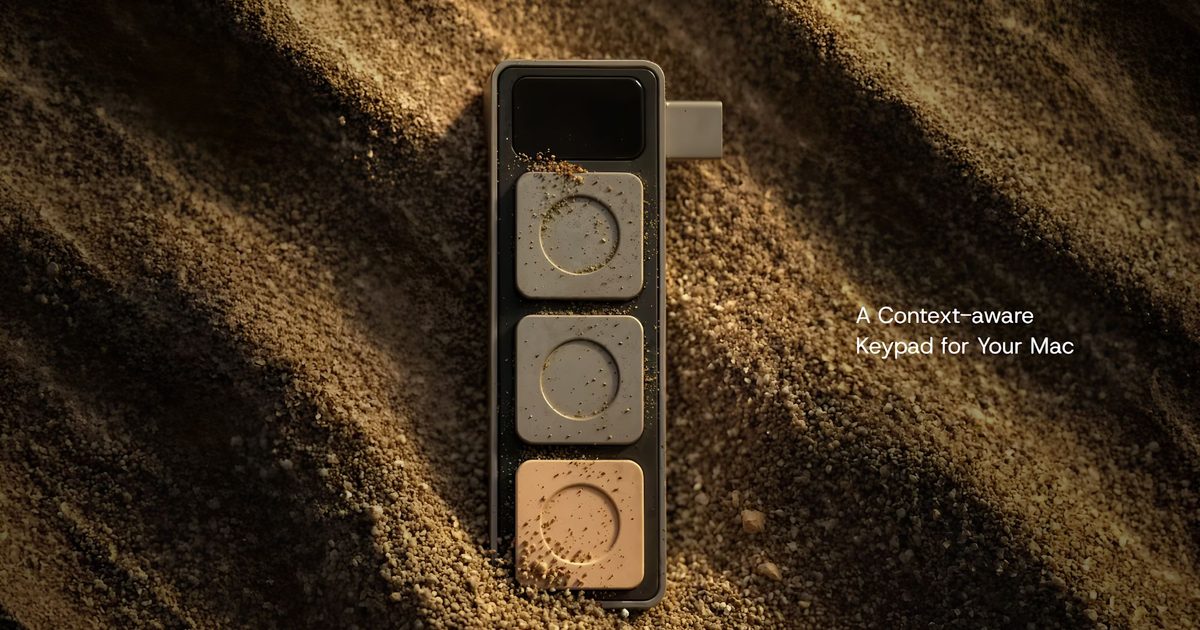
In the modern computing landscape, efficiency often hinges on the ability to navigate multiple applications seamlessly. Professionals juggle video conferencing tools, spreadsheets, development environments, and creative software, each with its own set of keyboard shortcuts. Remembering these combinations can be a productivity drain, especially during high-pressure meetings or complex coding sessions. Project Mirage, a startup focused on hardware-enhanced productivity, aims to solve this problem with a new accessory called Dune. This compact USB-C device attaches to the side of compatible MacBooks and offers three programmable buttons that automatically adapt their functions based on the currently active application. By bridging the gap between hardware and software, Dune promises to streamline workflows without requiring users to memorize a multitude of key combinations.
The concept of dedicated macro keypads is not new—devices like the Elgato Stream Deck and various gaming keypads have offered customizable buttons for years. However, these accessories often require separate software configuration and do not automatically sense which program is in focus. Dune differentiates itself by being context-aware: it uses a companion app running on macOS to detect the active application and dynamically reassigns its three buttons to the most relevant actions. This eliminates the need for manual profile switching and makes the accessory feel like a natural extension of the MacBook itself.
Physically, Dune is designed to match the aesthetics and form factor of modern MacBooks. It plugs directly into a USB-C port and sits flush against the device’s side, drawing power from the laptop and thus requiring no batteries or external charging. The accessory is custom-molded to fit specific MacBook models, ensuring a snug and unobtrusive fit. This design philosophy contrasts with bulky external keypads that clutter desks; Dune is meant to be carried with the laptop and used on the go.
How Dune Works: Context-Aware Shortcuts in Action
Dune’s core functionality revolves around its ability to change button assignments based on the app in focus. The companion app, which runs in the background, monitors active applications and applies preset configurations. For example, during a Zoom or Microsoft Teams meeting, the three buttons can be set to mute/unmute the microphone, toggle the webcam on/off, and bring the meeting window to the front. In spreadsheet software like Excel or Google Sheets, the same buttons become copy, paste, and undo. Developers working in Visual Studio Code or GitHub can assign actions such as build, debug, or commit. The system-wide actions can also include launching applications, opening specific websites, or executing custom scripts.
The configuration process is managed through the companion app, which offers a clean interface for creating application-specific profiles. Users can assign simple keyboard shortcuts, mouse clicks, or more complex actions involving multiple steps. For instance, a button could be programmed to type a recurring email template, open a terminal window and run a command, or start a timelapse recording. The app also integrates with the macOS calendar, allowing Dune to surface upcoming meetings and provide one-touch actions: join the call, dismiss a reminder, or send a “running late” message via email or messaging app.
This level of automation is particularly valuable for users who frequently switch between tasks. Instead of mentally shifting gears and reaching for different key combinations, a single press on Dune triggers the appropriate action. The tactile feedback of physical buttons also reduces the cognitive load associated with touch-based interactions, making the accessory feel more intuitive and responsive.
AI-Powered Customization: Claude Desktop Integration
One of Dune’s most distinctive features is its integration with Claude Desktop, an AI assistant from Anthropic. While the companion app allows manual configuration, many users may not have the programming knowledge to create sophisticated automations. Dune leverages Claude’s natural language understanding to bridge this gap. Users can describe the desired shortcut in plain English, and Claude generates the corresponding Python code, which is then assigned to a button.
For example, a user might type: “When I press this button, open Slack, find the channel standup, and post ‘Running late, will join shortly’.” Claude interprets the request, writes a script that interacts with Slack’s API or AppleScript, and binds it to a Dune button. This dramatically lowers the barrier to creating custom workflows. The user does not need to learn scripting languages or understand macOS automation frameworks; they simply articulate the desired behavior, and the AI handles the implementation.
Project Mirage emphasizes that the Claude integration is designed for safety and reliability. Users are presented with the generated code before it is assigned, so they can review and edit it if necessary. The system also logs executed scripts, providing transparency and debugging capabilities. This approach makes advanced automation accessible to non-developers while still offering flexibility for power users who may want to tweak the generated code.
Beyond Claude, the companion app supports AppleScript, shell scripts, and Automator workflows, giving technically inclined users ample room for customization. The AI integration, however, is the headline feature because it removes the primary obstacle to creating custom shortcuts: the time and effort required to learn automation tools.
Compatibility, Pricing, and Availability
Dune is currently compatible with MacBook Air models powered by the M2 chip or newer and MacBook Pro models featuring M1 Pro processors or later. Additionally, the device requires macOS Sequoia 15 or newer to function. This ensures that the context-aware technology can properly interface with the operating system’s application monitoring APIs. The company plans to expand compatibility to more devices in the future, though no timeline has been announced.
Pricing is set at an introductory price of US$119, after which it will retail for US$149. This positions Dune as a premium accessory, though its price is competitive with other specialized input devices like the Stream Deck Mini or the Loupedeck Live. Given the added value of AI integration and automatic profile switching, the cost may be justified for professionals who spend significant time in multiple applications.
The accessory is available directly through Project Mirage’s website, with shipping currently limited to select regions. The company offers a standard warranty and a return policy, reflecting confidence in the product’s durability and functionality.
Potential Impact and Market Context
Dune enters a market where productivity accessories are evolving from simple macro pads to intelligent peripherals that adapt to user behavior. The rise of AI assistants like Claude, ChatGPT, and Copilot has shown that users increasingly expect natural language interaction with their tools. Dune extends this expectation to physical hardware, making it possible to create custom automations without technical expertise.
For knowledge workers, developers, and creatives, the accessory could reduce friction in daily workflows. Consider a video editor who switches between Final Cut Pro, Finder, and Chrome. With Dune, they could assign buttons to common actions like split clip, reveal in Finder, and open reference material, all automatically mapped when the respective app is active. Similarly, a project manager might configure buttons to quickly log time in Harvest, check Slack notifications, or open a Trello board.
The device also has implications for accessibility. Users with motor impairments who struggle with complex key combinations may find physical buttons easier to press. The ability to create custom sequences with natural language further lowers the barrier for those who cannot type rapidly or remember many shortcuts.
However, Dune’s success hinges on several factors. The companion app must be reliable and update quickly as new versions of macOS and apps are released. The hardware itself needs to be durable, as the USB-C connection and flush-mount design will experience regular insertion and removal. Moreover, the library of pre-configured profiles must be robust; many users may not want to invest time in creating custom profiles from scratch. Project Mirage says it will regularly update the app with community-contributed profiles and official ones for popular applications.
Competition in this space is growing. Apple itself has introduced customizable Action buttons on the iPhone 15 Pro and the iPad Pro’s Magic Keyboard, though these are limited to a single shortcut. Third-party developers have created software-only solutions like Keyboard Maestro and BetterTouchTool, but they lack dedicated hardware. Dune occupies a middle ground—offering tactile buttons with the convenience of automatic context switching.
The integration with Claude also raises the possibility of future enhancements. As AI models become more capable, Dune could evolve to suggest shortcuts based on user behavior, learn from frequently performed actions, or even anticipate tasks before the user initiates them. Such proactive automation would mark a significant leap from passive macro pads.
Project Mirage is a small startup, but its vision aligns with a broader trend: the convergence of hardware, software, and AI to create more intuitive computing experiences. While it is too early to predict whether Dune will become a staple accessory, it represents a thoughtful attempt to address a genuine pain point. For many MacBook users, the device could prove to be a simple yet powerful catalyst for improving daily productivity.
Source:Digital Trends News